
Slack
Work Management & Productivity
Slack brings teams, messages, and files into one organized workspace. Collaborate faster, automate workflows, and turn conversations into measurable progress.
Access your team’s collective brain
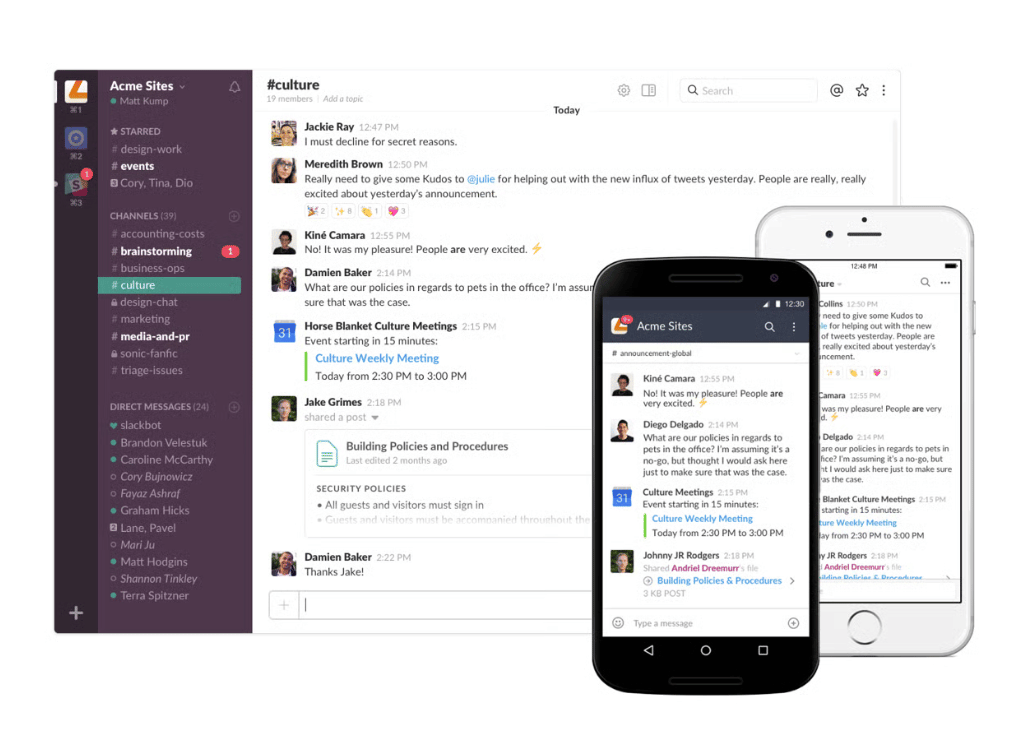
Need to recall who approved a proposal or what was decided last quarter? Ask Slack. Retrieve messages, documents, or updates in seconds, tracing every conversation and file across time so decisions are never lost, only learned from.
- Intelligent Search & Context Recall
- Automated Workflows & Integrations
- Smart Notifications & Summaries
- Secure Cross-Team Collaboration
- Unified Project Communication
Collaboration
Where Conversations Turn Into Action.
Slack unites teams, clients, and AI assistants in one collaborative flow. Type, talk, or automate updates without switching tools. With shared visibility and connected workflows, teams make faster decisions and move work forward effortlessly.
Integrations
Connect Your Stack. Eliminate Silos. Move Faster.
Slack integrates with over 2,600 tools your teams already use. From CRM and analytics to IT tickets and project dashboards automate approvals, trigger actions, and sync updates across platforms to keep workflows smooth and connected.

Slack Pricing Options
Pricing provided by Slack. (Public plan rates)
1. Free | $0.00
2. Standard | $6.67
3. Plus | $12.50
4. Enterprise Grid | Custom
1. Free | $0.00
Free | $0.00
Perfect for individuals or small teams starting collaboration. Organize conversations into channels, share files, and keep ideas searchable. Manage projects, connect teams, and stay aligned without limits on creativity or communication.
2. Standard | $6.67
Standard | $6.67
For growing teams that need structured communication. Unlock unlimited history, integrate external tools, and add guests for shared projects. Build predictable workflows, align discussions, and manage updates efficiently across teams.
3. Plus | $12.50
Plus | $12.50
For organizations needing reliability and control. Get advanced admin permissions, compliance features, and guaranteed uptime. Simplify approvals, manage visibility, and ensure collaboration stays secure and disruption-free every day.
4. Enterprise Grid | Custom
Enterprise Grid | Custom
For enterprises managing multiple departments or regions. Gain centralized governance, robust security, and large-scale administration. Standardize communication across divisions while maintaining flexibility and compliance organization-wide.
Creating Success
Slack Meeting Features
Connecting strategy and execution
Slack bridges strategy and daily collaboration. From leadership announcements to task updates, teams communicate instantly and keep execution aligned with shared goals across projects.
Empowering cross-functional teams
Slack empowers cross-functional collaboration by linking marketing, sales, and operations. Everyone shares context, files, and progress, ensuring smoother coordination and faster decision-making.
Turning data into collaboration confidence
Slack helps teams track key results, capture feedback, and share insights in real time. With transparent data and communication, decisions are smarter, and teamwork becomes continuous improvement.
FAQ
FAQs About Slack
Want to see if Slack
fits your team? Browse FAQs to compare plans, limits, add-ons, and the best setup path.
It’s a multi-channel marketing automation software that helps businesses attract, engage, and convert prospects by automating tasks across various channels like email, social media, and more.
Key features often include Lead Generation (forms, landing pages), Lead Nurturing (automated journeys, drip campaigns), Multichannel Marketing (Email, SMS, Social), Lead Scoring, Web Analytics, and a Marketing Planner.
Zoho Campaigns is primarily focused on email marketing, while Zoho Marketing Automation offers a broader, omni-channel approach that combines email, web, social, SMS, and journey creation for end-to-end customer experience automation.
Yes, its integration with Zoho CRM is a core strength, allowing for seamless data sync and a unified view of the customer journey, aligning sales and marketing efforts. It also integrates with other Zoho apps and third-party solutions.
Driving Real Results
3%
Of Google advertisers
100%
Growth clients
15m
Managed budgets